


Professionals in tech, whether they be developers, engineers, data scientists, or designers, are unlikely to fall for the claptrap of computer sales staff. They cannot be saddled with a suboptimal machine, nor seduced by the promises of a last minute sale.
And yet, when opening a shopping website they risk overestimating their powers of judgement precisely because they are experts, which may lead them straight into buyer’s remorse. Even if they know the technical specs of the product they are looking for like the back of their hand, they may neglect other details which a more casual consumer is perhaps more likely to notice.
Case in point, what sort of pitfalls should an IT professional of any stripe look out for when buying a laptop? Let’s take a look!
1. Overlooking The Keyboard
The most classic of not-so-rookie mistakes when buying a laptop is to give all consideration to the specs under the hood and none to the keyboard. You will spend a lot of time resting your wrists and hands on it for your job, so you want to make sure it is comfortable. If this is an option, it may actually be worth going into a shop in person so you can try the model with your own hands, rather than buying online. Otherwise, make sure you scour those user reviews to find out how others felt on that topic.
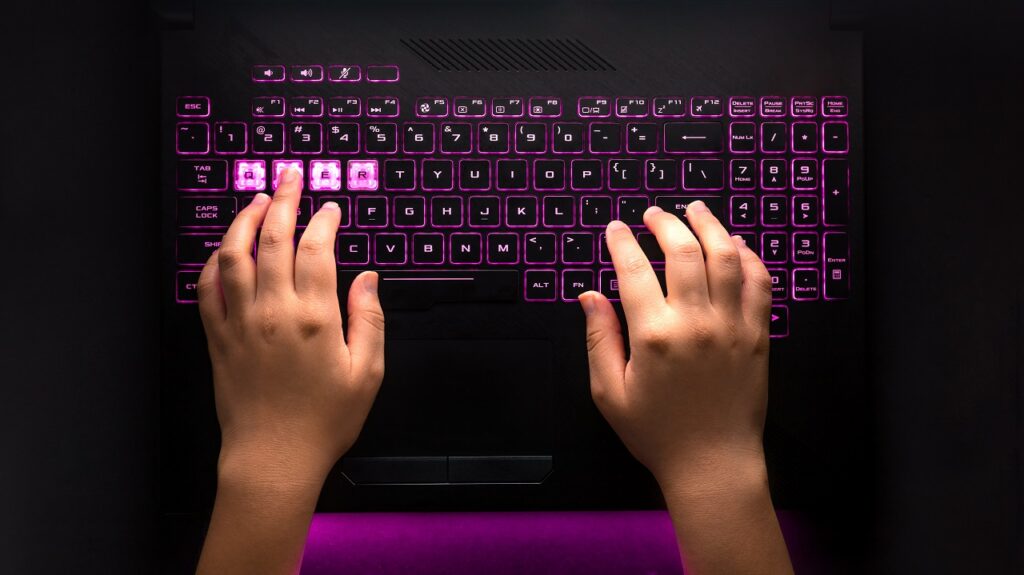
Keep an eye open for the size and positioning of certain keys which are essential to writing code – that means shift, ctrl, alt, home and end. Be careful, as some smaller keyboards do away with the end key altogether, and that is very far from ideal!
You should also seriously consider a keyboard that is backlit. Laptops are meant to be mobile, and you could well find yourself working in environments with inadequate lighting.
Naturally, the question of how important your keyboard is depends greatly on how you intend to use your laptop – if it’s just meant to be plugged into one or more workstations rather than used at airports and Cafes, then you’ll almost certainly want to buy a separate, plug-in keyboard. Just make sure you don’t treat this topic too lightly – wrist pain is among the most common health complications for programmers, and it can be surprisingly difficult to get rid of.
2. Not counting the USB ports
Here’s the deal: either you buy a laptop that already has at least four USB ports, or you factor in an investment in a USB docking station. Tertium non datur. In fact, depending on how central your laptop is to your work, the best thing may be to just do both.
Sure, when we buy a laptop, we naturally prioritise questions like how will it feel when we’re on the move. But in due time you will have to connect it to a whole bunch of other devices, including at least two monitors, probably a mouse and keyboard, potentially some audio devices, and anything else that may pop up depending on the job(s) you’re given.
Forgetting about a laptop’s USB ports is an oversight that can always be corrected later, by piling on docking stations. But it can’t hurt to think about it before rather than after you buy.
3. Weight Versus Monitor
There are two things everybody wants for their laptop, and unfortunately they are mutually exclusive: light weight, and a large monitor.
Precisely because tech professionals know laptops so well (and not in spite of that fact) they run the risk of becoming overly fixated on one of these two factors, to the exclusion of the other. The exact balance you want to strike depends, once again, on how you will use the machine.

Be wary of the assumption that you will always be on an external monitor, even if that’s the plan – a laptop should last you several years, and you don’t know how your conditions may change over that time. Remember also that a large monitor doesn’t mean a sophisticated monitor – you don’t need 4K resolution for a laptop (unless of course you work in animation, graphic design, or other jobs of the sort).
At the same time, understand that 1 or 2 kilos can make a substantial difference if you move around with your laptop a lot. Remember that you will probably be carrying it inside a bag together with a whole bunch of other stuff. And of course, the bigger your monitor, the heavier your laptop.
So ultimately you want to ask yourself how long you’re going to sit somewhere with your laptop and how much you’re going to carry it around. Just make sure you understand that monitor size and machine weight are to be assessed as a single question, not as two discrete ones.
4. Listening To Friends
I know, I know, I’ve chosen a controversial title – I’m sure your friends are lovely and I don’t mean to disrespect them in the slightest! But, once again, we may have to consider the possibility that specialised expertise may get in the way of general outlook.
If you have a friend who is a tech professional like you are, and you ask them which laptop is the best on the market, they may very well start on a long and detailed explanation as to why this or that MacBook Pro model beats all competition. Precisely because they know what they’re talking about so well, their arguments may sound extremely convincing. Even indisputable.

But here is the thing – there is a real risk that your friend will be describing the perfect laptop for their professional specialisation, and if this is even slightly different from yours, their argument may be misleading.
Say, for example, that their work involves processing large data sets. This means they will favour machines with powerful cooling systems, and these are typically heavy and loud. If your work doesn’t require as much processing power, then greater weight is only impractical and more noise only distracting.
If you are surrounded by friends who are experts and are able to advise you, then great. Just make sure their expertise is relevant to your line of work. The fact that they know what they’re talking about doesn’t mean that they know what you need.
5. Not Knowing Your Materials
We saved the most complex topic for last – so complex, that in fairness not considering this can barely be qualified as a mistake. In any case, one thing that very few people take into account and which may prove relevant – especially if you are buying online and lack the option of feeling the product with your own hands – is the question of what materials it is composed of.
Tom’s Guide has an extensive article about this, but said in short, the materials that go into a laptop affect its weight, durability, presentation, and heat dissipation. Importantly for those of us who will cycle through who very many of these machines throughout our career, factoring a laptop’s material makeup into our purchase is also an important way of evaluating its environmental impact.
And if you’re the sort who already knows how to evaluate a laptop based on its materials – well, I’ve got nothing to say to you. You’re clearly at a level where you don’t need to read an article like this!
Conclusion
Professionals in tech are often terrific experts in their field. But an expert is human just like anybody else, and therefore liable to human error.
This article is not meant as a guide on which laptop to buy – you know your own needs best, and you will be the best judge.
But perhaps just one of these entries helped you consider something you hadn’t thought of before. And if that is so, then this article did everything it was supposed to do.